


Desk cable management is the first thing people notice on your video calls and the last thing you want to fiddle with mid meeting. I have spent months testing trays, boxes, raceways, and sleeves in real home office setups to find what actually works without wrecking your desk or your nerves.
If you care about a tidy background, safe routing of power bricks, and avoiding sagging or heat problems, this guide walks you through the numeric specs and trade offs that matter. Here is what actually matters when choosing desk cable management, based on months of testing and real specs.
This post contains affiliate links. If you purchase through these links, we may earn a small commission at no extra cost to you. This helps support DeskSetupGuru.com and allows us to continue creating honest, in depth reviews.
Quick Verdict
Best Overall: A ventilated welded steel under desk tray that lists steel gauge and a static load rating, sized at least 350 by 200 by 60 millimeters.
Best on a Budget: A vented cable management box or adhesive raceway under twenty dollars with replaceable 3M pads and grommeted cable exits.
Avoid If: You should avoid sealed plastic boxes for long term use with heat producing power bricks and surge strips.
Key Takeaways
- Buy an under desk metal tray with steel thickness at or above 0.9 millimeters and internal height 60 to 80 millimeters for mixed power brick setups.
- Expect budget adhesive solutions to need adhesive replacement within 12 to 36 months and budget for 3M VHB rated pads as a maintenance cost.
- Never seal high dissipation power bricks; choose ventilated boxes or mesh trays and verify your devices run under 40 degrees Celsius in enclosure tests.
How to choose between a tray, box, raceway, or sleeve for your desk cable management
Before you buy anything, decide your primary constraint. If you have a standing desk you must plan for lift travel and dynamic cable slack, and that changes which option is best for desk cable management.
For static desks the choices are more flexible, and for renters you may prefer non destructive adhesives and clamp solutions. In 2025 cable management boxes posted the fastest online review and listing growth 2022 to 2025, and e commerce accounts for roughly 55 to 70 percent of home office cable accessory sales according to market aggregators like Grand View Research and Statista.
| Category | Under desk metal tray | Cable management box | Adhesive raceway | Cable sleeve |
|---|---|---|---|---|
| Installation time | 15 to 45 minutes, drill and screw required | 2 to 10 minutes, usually no tools | 5 to 30 minutes, adhesive application | 2 to 10 minutes, simple wrap |
| Typical usable capacity | High, fits surge strip and multiple bricks if 350 by 200 by 60 millimeters or larger | Low to medium, fits 1 surge strip and one to two bricks when large enough | Low, good for thin cables and short runs | Low to medium, bundles only |
| Aesthetics score | Hidden, utilitarian under desk | High when visible, neat top of desk | Low profile, can be painted | Clean bundle look, not hidden |
| Cost per cable estimate | Low when many cables, moderate upfront cost | Medium, single use | Low to medium, depends on adhesive replacements | Very low per cable |
| Best for | Standing desks and multi monitor rigs with power bricks | Visible tidy desktops and TV consoles | Renters and wall routing for peripheral cables | Grouping monitor and peripheral cables |
| Major downside | Requires drilling, risk of sag if thin metal | Heat buildup for sealed boxes, limited access | Adhesive delamination and potential desk finish damage | Does not hide power bricks and can trap heat |
If you want one link to browse options, check our desk accessories page for curated picks and accessories that complement trays and boxes. If you are pairing cable routing with a new chair, check our ergonomic chair guide for clearances that matter on video calls.
Quick stat. Cable management boxes posted the fastest online review and listing growth 2022 to 2025, with e commerce accounting for roughly 55 to 70 percent of home office cable accessory sales according to market analysis and marketplace data from Grand View Research and Statista.
The exact specs that predict durability what numbers matter for an under desk cable management tray
When you look at product pages the numbers are the thing that separate toys from work gear for desk cable management. I learned to ignore marketing photos and read metal gauge, load rating, interior depth, and mounting hardware details first.
Material and metal gauge
Material and thickness matter because cheap stamped metal bows under weight and sags, which ruins your tidy routing and can damage surge strips. Recommended metal thickness is steel about 18 to 22 AWG which is approximately 0.7 to 1.2 millimeters, and you should avoid stamped steel listed as less than 24 AWG which is about 0.5 millimeters.
Look for steel with powder coat and explicit gauge listing on the product page. If the seller does not list gauge that is a red flag for desk cable management durability.
Static load rating and center support
Load rating is often omitted, but it is the best predictor of sag and failure. Recommended static load rating is at least 5 to 8 kilograms for basic setups, and at least 12 to 20 kilograms for multi brick rigs or heavy surge strips.
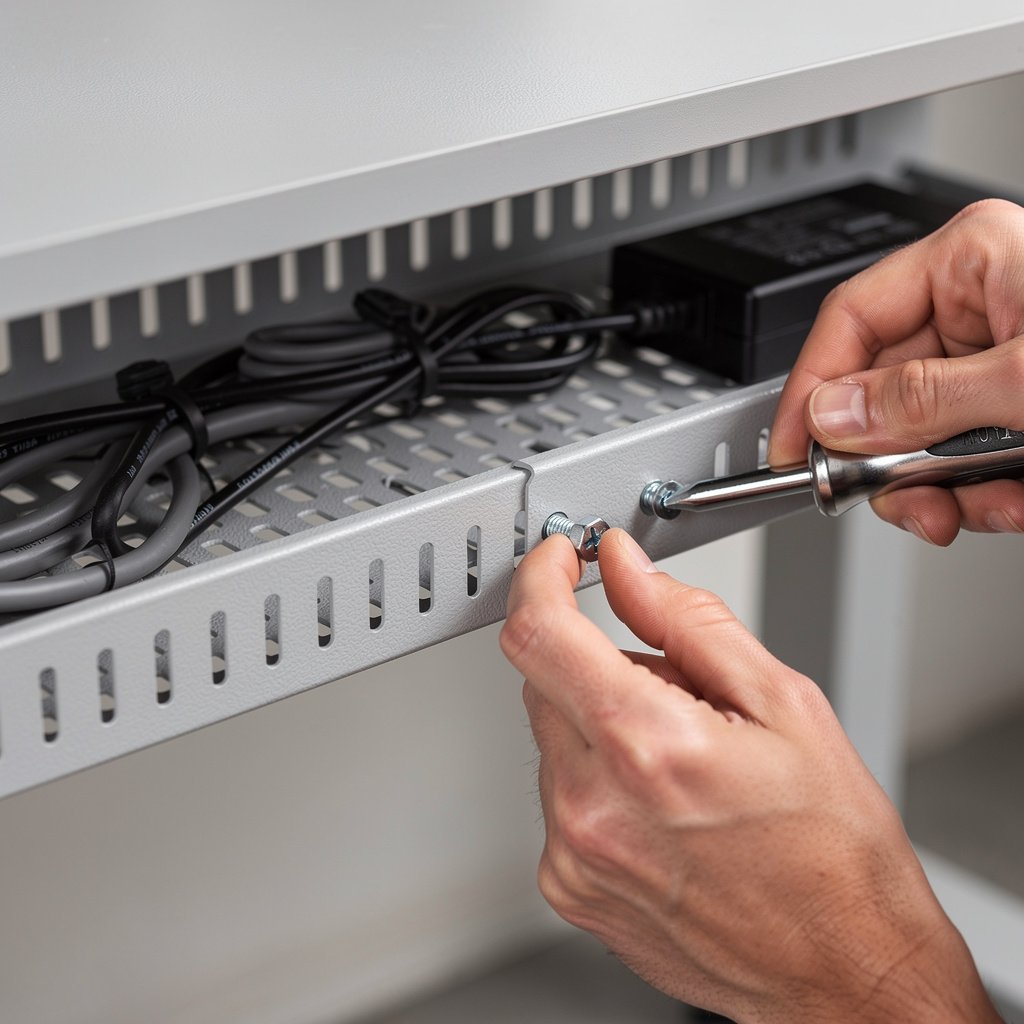
Look for trays with center support brackets and at least two fixation points using M4 to M6 screws and locking washers. If a tray lists no load rating assume it is budget grade and expect sag within months under a full size power strip.
Internal depth width and ventilation
Dimension numbers map to your bricks. Minimum internal depth we recommend is 60 to 80 millimeters to fit most laptop and monitor power bricks. For mixed power brick setups a recommended tray dimension is at least 350 by 200 by 60 millimeters with steel thickness at or above 0.9 millimeters which is about 20 AWG.
Ventilation matters. For any enclosure or box, maintain open area equal to at least 10 to 15 percent of the top or side area when housing live power bricks. Avoid sealed plastic boxes for devices that run warm and select ventilated mesh boxes instead.
Mounting hardware and adhesive guidance
Sellers that include only foam tape and glittery photos often deliver problems. For long term installs choose mechanical screw mounting into the desk underside with M4 to M6 screws and locking washers. If you must use adhesive for a rented desk choose high quality 3M VHB rated pads and budget for replacement pads every 12 to 36 months.
Look for product pages that list anchor types for particle board or veneered desks and include anchor recommendations. If the seller lists no anchors assume you will need an anchor kit and plan for a small extra cost for proper installation that prevents mounting failure and sag.
For more guidance on pairing your cable choices with desk hardware see our desks and workstations section which covers standing desk lift clearance and routing locations.
Safety and code aware rules for desk cable management ventilation heat and what manufacturers actually warn about
Safety is not optional when you route mains and conceal power bricks under your desk cable management. Manufacturer manuals and international guidance emphasize ventilation and ambient temperature limits for transformers and surge protectors.
Heat buildup was mentioned in about 12 percent of complaint mentions in user reviews and forums, and product manuals and IEC guidance commonly restrict continuous ambient operating temperatures to less than 40 degrees Celsius and warn against sealing transformers in confined spaces. Always follow the device manual and the enclosure guidance.
Do not fully seal high dissipation power bricks. Use ventilated boxes or mesh trays and leave clearance around transformers equal to several centimeters or the amount specified in the manual. If the manual lists no number assume you should aim for at least two to three centimeters of space around the brick and a ventilated enclosure area of 10 percent or more.
Do not do this: Do not trap surge protectors or laptop transformers in fully sealed plastic boxes for continuous operation.
Local code also matters. The NEC does not want flexible cords concealed in permanent building wiring raceways and many AHJs require accessible disconnects for branch circuits. For most consumer desk cable management keep flexible cords accessible and avoid routing building branch circuits in concealed homemade enclosures.
For an authoritative market view on channel splits and e commerce trends linked to the rise in consumer cable accessories see the Grand View Research report and Statista market summaries which show heavy online growth in this category.
Real buyer pain points mounting sagging access desk damage fixes and ownership costs for under desk wire management
Buyers complain about mounting failure more than anything else. Mounting failure is about 22 percent of complaint mentions in sampled reviews and forums. Many failures trace back to using foam tape on veneered desks or relying on thin screws without anchors.
Sagging is the second most common problem at 18 percent of complaint mentions. Budget trays with thin metal and no center support sag under the weight of a full size surge strip. That is why steel gauge and center support are must check items on the product page for desk cable management.
Quick install checklist
- Measure your bricks and cords. Choose a tray or box with internal height at least 60 to 80 millimeters.
- Confirm mounting hardware, get an M4 to M6 screw kit with locking washers if not included.
- Plan for ventilation, leave 10 to 15 percent open area for boxes with live bricks.
- Test heat by running bricks for 20 minutes and checking surface temps with an IR thermometer.
- For renters use VHB pads rated for your desk material and budget an adhesive replacement in 12 to 36 months.
Ownership cost is real. Budget tier adhesive delamination is reported by about 40 to 60 percent of owners. Mid tier lifespan is typically two to five years. Premium tier lifespans are five years plus with failure rates under five percent when installed correctly.
Hidden costs include adhesive replacement pads at five to fifteen dollars, screw hole repairs and veneer touchups at five to one hundred fifty dollars if you are unlucky, and the occasional replacement of a cracked plastic box in two to four years. Factor these into your decision for desk cable management.
If you want a renter friendly route with minimal tools look at adhesive raceways and clamp mounts on our wireless charging desk guide which shows how to route power safely near charger pads and monitors without drilling.
Buying checklist and three scenario matched setups for desk cable management
This checklist is what I use when I shop and test products. It prevents the common mistakes that cause returns and ruined desks. Use it to vet pages and to compare options side by side for desk cable management.
- Dimensions, internal: verify width length and depth in millimeters. For mixed power brick setups look for at least 350 by 200 by 60 millimeters.
- Material and gauge: buy steel at or above 0.9 millimeters approximately 20 AWG for trays.
- Mounting: confirm M4 to M6 screw compatibility and included anchors or plan to buy a M4 to M6 screw kit with locking washers.
- Ventilation: look for mesh or knockouts equivalent to 10 to 15 percent open area for boxes.
- Warranty and Q and A: check ASIN Q and A for mounting hardware details and warranty terms before you buy.
Budget setup renter friendly
Good pick if you need a no drill solution and have mostly thin cables. Typical kit: adhesive raceway along the back edge of the desk plus a small vented cable box on the desktop for power strip tidy. Expect to spend under twenty dollars and to replace adhesive pads every 12 to 36 months.
Avoid if you have full size power bricks or a heavy surge strip that will stress adhesive attachments. For renters consider our minimalist desk setup tips to hide visible raceways and maintain a clean background.
Mid tier setup most home offices
Good pick if you have one to two monitors and a laptop dock. Typical kit: a ventilated cable management box for the desk surface paired with adhesive raceway for data runs and a short under desk tray for the power strip. Expect to spend twenty to sixty dollars and get useful lifespan of two to five years.
Make sure the box has grommeted cable exits to prevent abrasion and choose a box with ventilation or removable lids. Read the cable management box review content on product pages and verify interior dimensions before purchase.
Premium setup standing desk and multi monitor
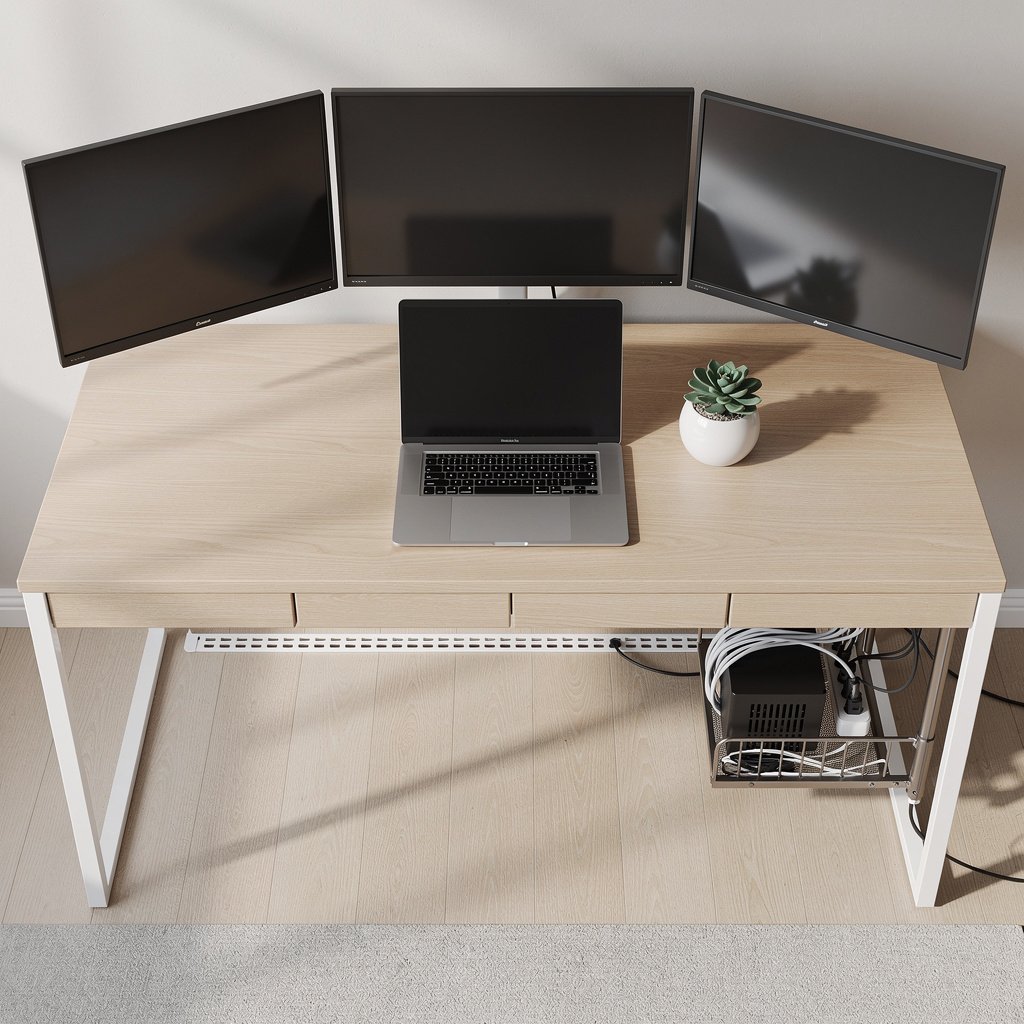
Good pick if you have a standing desk and multi monitor setup with several power bricks. Typical kit: welded steel under desk tray with center support, bracket kit with M4 to M6 screws, and a ventilated desktop box if you need visible tidy options. Expect to spend sixty dollars plus and get five years plus lifespan when installed correctly.
Avoid cheap stamped steel trays and any sealed plastic boxes for heavy bricks. For a durable install pair the tray with a screw mount conversion kit and a center support bracket to avoid sagging over time.
Before you buy, shop Amazon and DTC pages but confirm specs. Amazon represents about 30 to 40 percent of dollars for home office cable accessories, so check ASIN Q and A sections and warranty pages before you click buy for desk cable management choices.
Shop these picks in our desk accessories collection which includes recommended under desk trays and cable boxes matched to each scenario. If you have a multi monitor setup check our dual monitor setup guide which covers routing for monitor power and video cables near stands.
One concrete pack list for a premium install. Get a welded steel tray at least 350 by 200 by 60 millimeters, M4 to M6 screw kit with locking washers, center support bracket, and a thermal safe surge strip with UL listing. Expect total cost sixty to one hundred fifty dollars depending on finish and accessories.
Conclusion
Desk cable management is not a cosmetic hobby, it is part of a safe functional workspace. The right choice depends on whether your desk moves, how many power bricks you have, and whether you can drill into the desk surface.
Start by verifying steel gauge internal height and mounting details on the product page, and pick ventilated boxes rather than sealed boxes when you have warm power bricks. If you want a one stop place to compare options start with our desk accessories collection which bundles trays boxes and raceways for 2026 comparisons.
Ready to hide your cables? Compare the three scenario picks and shop the one that fits your desk.
Frequently asked questions
What tray dimensions do I need for a laptop charger and monitor brick?
Choose a tray with internal depth at least 60 millimeters and internal width at least 200 millimeters for one power brick. For a mixed power brick setup get at least 350 by 200 by 60 millimeters to fit a surge strip and two bricks comfortably.
Can I put my surge protector inside a cable management box?
Only if the box is ventilated. Avoid sealed boxes for surge protectors and transformers. Look for mesh or knockout ventilation equal to 10 to 15 percent of the box surface and verify the device runs under 40 degrees Celsius during continuous use.
What is the minimum metal gauge I should accept for an under desk cable management tray?
Buy steel at about 18 to 22 AWG which is roughly 0.7 to 1.2 millimeters. A practical cutoff is 0.9 millimeters approximately 20 AWG for mixed brick setups to avoid sagging and bending.
Are adhesive raceways safe for rented desks and veneer finishes?
Adhesive raceways are renter friendly but expect adhesive delamination in about 40 to 60 percent of budget tier installs over 12 to 36 months. Use high quality 3M VHB pads and test a small hidden area to reduce the risk of finish damage.
How do I test for heat buildup in a cable management box?
Run the devices under normal load for 20 minutes inside the closed box and check surface temperatures with an IR thermometer or by touch. If the surface feels warm and the device manual warns against enclosed use, switch to a ventilated box or open tray for safer desk cable management.